
COMPUTER NETWORKS
This blog is an excerpt from a live training session of the ABC OF CLOUD COMPUTING 2025 cohort.
On this week’s editorial, ABC OF CLOUD COMPUTING hosted a combined audience of 276 trainees from the Saturday and Sunday live training. The Sunday live training began with a brain refresher quiz on kahoot of which Adesumbo Adeleke, Promise Ekiko and Situk Ime Udoakpan took the lead in that order. Others followed closely behind. The trainer Solomon Francis Jeremiah, introduced the topic, “computer networks”
WHAT IS A COMPUTER NETWORK?A computer network is a collection of interconnected devices that can communicate and share resources with each other. These devices often reffered to as nodes can inlude, computers, printers, servers and other hardwares. The connection between these nodes can be established using physical cables like ethernets or wireless technologies.

Key points about computer networks:
- Nodes or Interconnected devices: multiple devices, like computers, servers, and printers, are linked together using cables or wireless connections to form a network.
- Data sharing: The primary function of a network is to enable the transfer of data between connected devices.
- Resource sharing: Networks allow users to access shared resources like printers, storage devices, and applications across multiple devices.
Let us examine types of computer network
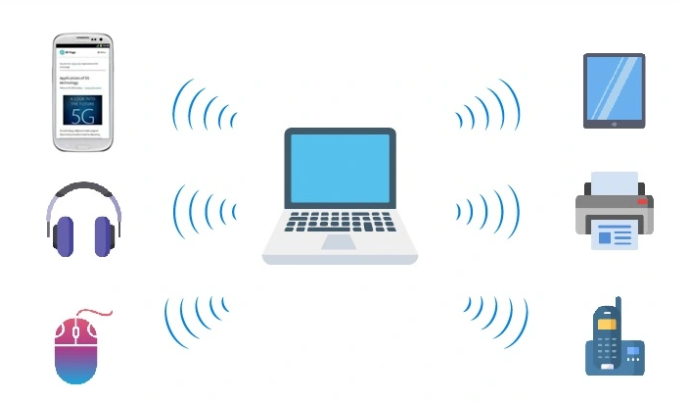
Types of Computer Networks- Personal Area Network (PAN): A PAN is the smallest type of computer network, designed for a single person’s use. It typically connects personal devices within a short range (about 1 to 10 meters or 30ft). This type of connection is mostly characterized by short-range communication. It is mostly used for personal data transfer and synchronization. It uses common technologies like bluetooth connection, Wi-Fi.

- Local Area Network (LAN): a Local Area Network (LAN) is created by connecting multiple devices within a limited area, such as a home, office, or school, to enable communication and resource sharing. It is less expensive as it is often built with inexpensive hardwares such as hubs, ethernet cables and network adapters. Data is typically transferred at a faster rate on LAN. An example of such network can be found in small office complexes.

- Metropolitan Area Network: a MAN covers a city or metropolitan region, larger than a LAN. It does this by interconnecting different LAN networks together through a telephone exchange line. Examples of MAN connection are, Cable TV networks, bank branch networks spread across multiple locations. This type of connection is typically managed by goverment agencies or Internet Service Providers (ISPs). It uses high speed connection like fibre optics, microwave links – useful for wireless MANs where fiber is not feasible.

- Wide Area Network (WAN): a Wide Area Network is a netowrk that extends over a larger geographical area. Such connections can cut across states or countries. It is usually not limited to single location. WAN connections can be created through telephone line, fibre optic cables or satellite links. A WAN connection is typically an internet connection.

The 4 types of network connection explained above are the most popularly used type of network connection, however, it is not limited to this four only.

Let us examine a few more types of network connection:
- Campus Area Network (CAN): it’s a network that connects multiple LANs within a specifc area like a university, hospital, corporate campus, or industrial complex. It spans a larger area than a LAN but is smaller than a metropolitan area network (MAN).
- Storage Area Network (SAN): is a high-speed network that provides dedicated access to storage devices, allowing multiple servers to share storage as if it were locally attached.
- Virtual Private Network (VPN): is a secure way to connect to a private network over the internet. It encrypts data, masks your IP address, and allows users to access network resources securely from remote locations.
Having understood the different kinds of network connection, another important concept to understand is, Network Topology.
Network TopologyA network topology refers to the arrangement of devices and connections in a network. It defines how computers, routers, switches, and other network devices are connected and communicate with each other. Network Topology also define how data flows between them.
Types of Network Topology- Bus Topology: All devices are connected to a single central cable (backbone) that runs through the network. In this connection, data travels in both directions along the backbone. Each device listens for data packets and processes only those addressed to it.
Key Features:
- Simple and cost effective to set up.
- Data travels in bothe direction along the Bus.
- If the main cable fails, the entire network goes down.
Use Cases:
- Small network such as in small offices or homes.
- Legacy networks (less common in modern set-ups).
Example: a small office where all the computers are connected to the sam ethernet cable.

- Ring Topology: a ring topology is like a Bus topology, but with connected ends. The device that receives then message from the previous computer will retransmit to the next. The data flows both bidirectionally and unidirectionally, meaning that, it can flow in both directions and in one direction.
Key Features:
- If one device fails, it can disrupt the entire network.
- It is less common in modern networks.
- Data flows both bi-directionally and uni-directionally, meaning that, it can flow in both directions and in one direction.
Use Cases:
- Older networks or specialized systems.
- Token Ring networks (a legacy technology).
Example: a small office using token-passing system for data transmission.

- Star Topology: here, all devices are connected to a central hub or switch, which manages data traffic.
Key Features:
- Easy to install and manage
- If one device fails, it does not affect the rest of the network.
- The central hub is a single point of failure.
Use Cases:
- Home networks and office networks connected through Wi-Fi routers.

- Mesh Topology: every device is connected to every other device in the network. This connection creates multiple paths for data.
Key Features:
- Highly reliable and fault tolerant
- Expensive and complex to set up due to many connections.
- Used in critical systems where downtime is unacceptable.
Use Cases:
- Military or emergency communications systems.
- Smart home devices and redundant connections.
Example: a smart home where devices like cameras, thermotats, lights are interconnected for seamless connection.

- Tree Topology: this is a hybrid topology that combines star and bus topologies, with multiple star networks connected to a bus backbone. Devices are arranged in a hierarchical structure.
Key Features:
- Scalable and easy to manage.
- If one branch fails, it does not affect the whole network.
- The central root node is a single point of failure.
Use Cases:
- Large organizations with multiple departments.
- Wide Area Networks (WANs).
In conclusion, computer networks are essential for modern communication, enabling seamless data exchange, collaboration, and resource sharing. The topology of a network—whether Bus, Star, Ring, Mesh, Tree, or Hybrid—determines its efficiency, scalability, and fault tolerance. Understanding these structures helps in designing efficient, secure, and scalable networks for businesses, institutions, and industries.
If you found this resource useful, do not forget to connect with us through any of these topologies: share, comment, react.

To the cloud and beyond 🚀🚀🚀
Written by: Felix Williams
Editor: Solomon Francis Jeremiah


